Reliance Jio 4G Preview Guide: Getting your free SIM..

By techeye123

Reliance Jio seems to be the buzz word in India off late, and quite rightfully so. The Mukesh Ambani-led Reliance Industries Limited subsidiary has much-ambitious plans to offer up to 80 per cent of Indians high-speed mobile Internet as well as voice services in the days to come. It hasn’t exactly given out a launch date yet, but the company will likely roll out its 4G services sometime in the second half of this year. Previous reports hinted at an August timeframe. It is now being speculated that Jio 4G will go live in October. But that will happen when it will happen. The company’s much-talked about Preview (or beta) offer seems to have already ignited a war (of data and voice) of sorts in the Indian telecom sector before the actual roll-out. Every big company ranging from Airtel to Idea is lining up to offer ‘free’ services to make their subscribers stick, and woo new subscribers along the way.
The Reliance Jio 4G services (beta) were initially available to Jio’s partners and employees, only. These services have been available for them to use since December last year. The beta offer essentially includes unlimited access to Jio’s Digital Life – HD voice call, HD video call, apps, data and SMS – for three months. Once Jio’s partners and employees surpass the three-month limit, they are required to go online and recharge their subscription to extend the scheme for another three months.
The availability – of Reliance Jio 4G Preview scheme — has eventually been extended to the general public. Clearly, the company wants as many people as possible to get a sneak-peak into its services, before the actual launch. This would give them some idea of what’s in store, and perhaps make an informed choice later when the services are officially rolled out.
Getting a hold of the Reliance Jio 4G Preview offer for the regular (and the uninitiated) folk is a little tricky though. It isn’t as easy as going into a Reliance Digital or Digital Xpress Mini Store and asking for a Jio SIM in exchange for a photo ID. There’s more to it than meets the eye.

>>Getting a Reliance Jio 4G SIM isn’t easy, but it’s worth it

1. The easy way out
Buying a Lyf smartphone is the easiest method to get a Jio SIM, for free. Every Reliance Lyf smartphone comes pre-bundled with a SIM card that is pre-activated with Jio’s 4G Preview offer. Simply buy the phone, and you’re good to go. Problem is, almost all of the Lyf smartphones suck. Prices range from Rs 3,000 to around Rs 20,000. There have been some price cuts along the way, especially in the Rs 15,000-20,000 price bracket. Still, it’s hard to recommend a Lyf smartphone over already existent smartphones. What if I want just the Jio SIM, and I want it easy? Well, I would go buy the cheapest option: Flame 3, Flame 4 or Flame 5. I am personally not recommending the phones to anyone, but if you mind all the hassle and technicalities of getting a Jio SIM, buying the Flame 3, Flame 4 or Flame 5 is the only (easy) way out there, for now.
2. One for the elite: Go get yourself a Samsung phone

Jio has tied up with Samsung to offer its 4G Preview scheme on select handsets. These include the Samsung Galaxy A5 2015, Galaxy A7 2015, Galaxy A8, Galaxy Note 4, Galaxy Note 5, Galaxy Note 5 Duos, Galaxy Note Edge, Galaxy S6, Galaxy S6 Edge, Galaxy S6 Edge Plus, Galaxy S7, and the Galaxy S7 Edge. If you have any of these phones, well, consider yourself lucky.
I personally used a Samsung Galaxy S7 to get myself a Jio SIM. The first step is to get yourself the My Jio app from the Play Store. That’s crucial. That’s because it is the Mi Jio app that will help you generate a Preview code (a bar code) that’s a pre-requisite to get a Jio SIM. On a phone that qualifies to get a free Jio SIM, the app gets straight to business. In fact, after generating the code it also gives you a list of Reliance Digital and Digital Xpress Mini Stores in your area. Once you have the code, you’ll have to visit the Reliance store to get the SIM. Make sure you carry two recent passport-sized photographs along with a valid photo (and address) ID, for instance your Aadhaar Card (original and a photo-copy), to the store. Also, make sure you’re carrying the phone with you since they ask you to show it to them before going any further. Rest of the process is similar to how you get any other SIM card in the market.

— Previously, you could manage to get a Jio SIM for free using any 4G LTE-capable smartphone. This was because the My Jio app had a bug that allowed for it to generate a Preview code on any smartphone. With the code at hand and some fancy verbal skills, you could manage to talk the Reliance store people into giving you a SIM. Not anymore though. The My Jio app has been updated, and the bug has been fixed. Only select (Samsung) phones can now generate the Preview code, meaning not everyone qualifies to get the free Jio SIM. Also, they have been probably asked to check whether you have the ‘select’ phone with you before handing you the SIM.
— The same phone cannot be used to get two SIM cards. Once I got a SIM, I factory reset my phone and logged in with a different Google ID. I installed the My Jio app again, and it would still show that my phone had already been used to activate the Jio Preview scheme. This could mean that the My Jio app may secretly be recording the phone’s IMEI number upon activation. Privacy, anyone?
             Also Read: Books one must read in his life


— The My Jio app has under it as many as 11 additional apps. While three or four of these will have to be downloaded and installed by default to activate your SIM, folks back at the Reliance Store would ask you to install them all. One of them even told me that if I uninstall any of the apps, my Preview scheme would stop working. That’s not the case though. Still, some of these apps like Jio Play, Jio Beats and Jio Express are handy. Might as well make a folder and place them all inside together to avoid confusion. They don’t take up much space either. Since, the offer is still in beta, it’s better to play safe and keep all the apps at hand, at least for three months.
— There have been some reports that the offer is also applicable on some new iPhone models like the iPhone 6, iPhone 6 Plus, iPhone 6S, iPhone 6S Plus and the iPhone SE. But it hasn’t been officially confirmed yet.

>>SIM activation is fast and easy

The Reliance Store people would tell you that it takes up to 24 hours for the SIM to be activated. But, it doesn’t. It takes even less. An hour or so at the max. They will ask you to provide a secondary mobile number that would be used to send the verification message. I received mine in about an hour’s time. Once you get the message, simply insert your SIM card (inside the ‘select’ phone and not any other phone) and call 1977 to activate it. The tele-prompter will ask you to dial the last four digits of the ID proof that you provided at the time of verification. That’s it. The SIM will be activated and will be good to go.
Points to remember:
— Do not use any other phone to activate the Jio SIM. I tried and it did not work. Once it has been activated, the SIM can be taken out and used in any other 4G LTE phone and it will work just fine. Make sure your phone is also VoLTE-ready because if it isn’t call-quality would differ drastically.
— Initially, when I put in the activated SIM inside a different 4G phone, voice-calling and incoming calls wouldn’t work. But, they started working after some time. Clearly, patience is the key here. The ‘other’ phone did however have access to 4G Internet right from the word go.

>>The curious case of ‘only’ 2GB free Internet

Once the SIM has been activated, the first thing to do is to open the My Jio app. The app would log you in automatically using the activated SIM credentials, but you can also choose to manually change your ID and password. I did not. The app has a hamburger menu. In it there are various subheads. One of them is called My Plans. If your SIM has been activated correctly, you’ll see a total of three plans in ascending order. The first one is called your Current Plan that has a Base Plan Offering for VoLTE plus WiFi. Second is a free recharge voucher (FRC) that holds 2GB of 4G Internet data, 100 SMSs and 100 minutes of voice and video calling. Under that is the most important one of them all: Jio Preview offer for Partner (in this case the Samsung phone).

Honestly, I was a little sceptical about the whole 2GB free data thing. I was kind of alarmed as well. Anyone would, since it appeared that I wasn’t getting ‘unlimited’ Internet and everything. The obvious next step would be to reach out to the Reliance Digital store (or call centre) from where I got the SIM. Sadly, they weren’t the best help in such a situation. They kept asking me if I had installed all the Jio apps, and if I had I would get unlimited data. No one told me that that’s how the whole My Plan chart looks like. And that, having the Jio Preview offer for Partner mention in the end means, the SIM is working just fine. Anyhow, I decided to consume all my 2GB ‘free’ data as quickly as possible. Thankfully, that wasn’t the end of it.

                    Also read: Tips for a good CV
–You actually get ‘unlimited’ of everything at high-speed if you manage to get your Jio SIM activated. No holds barred.

>>Living a dream, the 4G dream:

India is marred by shoddy Internet connectivity. The Reliance Jio 4G Preview (for three months) seems to be the only glimmer of hope for the country, in the current circumstances. I really don’t know how things will pan out once these services go live. Note that nothing has been decided (and announced) yet: plans, tariffs, nothing. I really don’t know if the Preview is just another marketing gimmick (like Ringing Bells’ Freedom 251) to create hype, and make people interested. I really don’t know, if Jio would change anything as far as India’s connectivity woes are concerned. But what I do know is that the Jio 4G Preview offer is awesome. It’s fast and reliable, in fact everything seems dream-like. I would say, the speed has hit a minor hit post the 2GB free data consumption, but it’s still super-fast and super-reliable. I have been watching lots of Netflix and lots of YouTube, with no buffer at all. Meanwhile, VoLTE-calls are just super-incredible and super-crisp. There have been some odd call-drops here and there but I’d say that’s the weather’s fault rather than Jio’s.
Overall, I am pretty impressed with Jio’s Preview, hope it gets even better post the official release. Just to conclude, I advise everyone who can get their hands on Jio Preview, to actually get their hands on Jio Preview before the offer dies out. Remember, three months hence, you’re allowed to take that SIM out and not use it any more.


              Books a Programmer Must Read...!!


                  Here is the list of all books required for a Programmer or a Tech. Geek . Every begginer in field of Computer Science lacks study material for different programming languages.....So here is the list of essential books for programming languages at on place with their direct download links.....


1. JAVA PROGRAMMING:
You must have heard about Java ,,It is a high-level programming language originally developed by Sun Microsystems and released in 1995.While Installing java you’ll see it will tell it’s own features that Java run more then billions of Electronics and every Connection and Programs.Java is also very useful but I would prefer you to learn Java Basic to have knowledge of Java Programming.
  1. Java Programming Advance + Middle Age
  2. Java Tutorial for Beginners

2. JAVASCRIPT PROGRAMMING:

Javascript is a programming language of HTML and the Web.JavaScript is easy to learn.These tutorial will teach you JavaScript from begginer to advanced.I would prefer you to learn Javascript after HTML so you can be the Best Web Programmer. I hope you can see a twitter bird flying on your Screen, just look on page – that bird is designed and moving because of javascript whatever web animations.

  1. Beginning JavaScript
  2. Complete JavaScript Book
  3. JavaScript 1.1 Complete Tutorials
  4. Learn JavaScript in 10 Days

3. C PROGRAMMING:

C Programming is one of the Popular and most Wanted Programming language ever, C is very useful to create Softwares and Programming Software, mostly C Programming is widely used in Programming Linux, Windows and OS.
  1. C Programming for Beginners
  2. C Programming Medium Level Tutorials
  3. C Sharp Programming Advance
  4. Deep C Programming Advance

 4. C++ PROGRAMMING:

C++ is the Next Generation of C. C and C++ not having much difference but C++ is popular nowadays coz, easy to understand and easy to learn C++ instead of C. C++ is from same category of Software Programming, Mostly whatever program we use in Computer are designed and Created into C++, I would prefer you to learn C++ Instead of C.
  1. C++ beginners (14 Days Learning Course Book)
  2. C++ Better Device Software Development
  3. C++ Middle Engineering Tutorial
  4. Practical C++ Programming  
5. PYTHON:
Python is one of the most advance and Most adorable Programming language it. It’s just awesome since from 1990’s. Python is a high level programming language which increasingly popular. I have collected Some Beginners and Medum level Python Programming E-books free which contains lots of exercises, practices, example programs and many more. I hope you’ll like and Share it.
  1. An Introduction to Python
  2. A Byte of Python
  3. How to think like a computer scientist (Python Programmer)
  4.  Think & Program Python
6. HTML WEB PROGRAMMING:
HTML (Hyper Text Markup Language) is the web Programming language the most most most useful and useable Web Programming language, Programmer, hacker, developer everyone need to learn HTML. HTML is the Source and Base of all Web Programming languages, If you don’t know HTML then you can’t learn any Web Programming lang. I would prefer you to learn HTML and HTML 5 before starting to Javascript or PHP.
    1. HTML + XHTML Programming
    2. HTML Advance Codes
    3. HTML Basic for Beginners
    4. HTML Important Codes and tutorial
    5. HTML Programming Lessons
  1.    Also read: Tips for a good CV

  2. 7. ANDROID DEVELOPMENT :
Android is the biggest and largest Mobile OS running on our Planet, Android run Millions of Gadgets, Smart Phones and therefore Android Apps are widely used everywhere there are millions of Developer develop apps daily and Publish on Google Play and Earn Money, Even you can do that and earn money, but first of all you’ll require Android App Dev Kit and tutorials to dev Android Apps, Here I’d collected some E-books to make Android Apps and Learn Android Software Programming.
  1. Android Apps Dev. Medium Level
  2. Android Professional Software Dev Tutorials
  3. Complete Android Apps Development Collection
  4. Welcome to Android Software Developement
  5. Android Apps Creating tutorials with Complete Guide

8. PHP , MySQL PROGRAMMING:

As you know that SQL is a Programming lang. of Database (Structured Query Language) without SQL, we can’t login to any website and access our files. SQL is the most useable Pogramming lang. SQL is only use for Database Structuring storing info data. Now PHP (Hypertext Pre-processor or Personal Home Page) PHP is widely used in web applications to connect with Server, Web Applications and SQL DB. PHP is really very useful in Web Programming world, without PHP there could be nothing. Every Hackers need to learn PHP,SQL and SQLI (SQL Injection).
  1. Learn SQL in 24 Hours
  2. PHP + SQL tutorials
  3. PHP Guidence and Tutorials
  4. Teach yourself Complete SQL in 21 days

Many tests and researches have shown that Windows 10’s Movies & TV app offering more than double the battery life of VLC and other video players. This is because Movies & TV uses hardware acceleration, VLC also supports but we just have to enable it first. Then, you’ll be able to enjoy the advanced features of your favorite video player without the battery draining.


>>What Is Hardware Acceleration?

Before I tell you about the feature....firstly know what is hardware acceleration.There are several different ways to play back a video. One is through “software decoding”. A video player reads the video file and decodes the information using your computer’s processor, or CPU. Modern CPUs can handle this and provide smooth video.

Hardware accelerated decoding, however, is much more efficient. With hardware acceleration, the CPU hands off the decoding work to the graphics processor (GPU), which is designed to accelerate the decoding (and encoding) of certain types of videos. In a nutshell, the GPU can do certain types of math faster and with less electricity required. That translates to longer battery life, less heat, and smoother playback on slow computers.

Unfortunately, many modern video players–VLC included–don’t bother using hardware acceleration by default, even if they support it. So you need to turn it on yourself.Here is how one can do it...👇👇

>>How to Enable Hardware Acceleration in VLC

You must enable hardware acceleration if you’re using VLC on a laptop or tablet. The only reason not to do so is that this may cause compatibility problems on some old systems, particularly older computers with buggy hardware drivers. If you encounter a problem with playing video in VLC, you can always disable this option later.

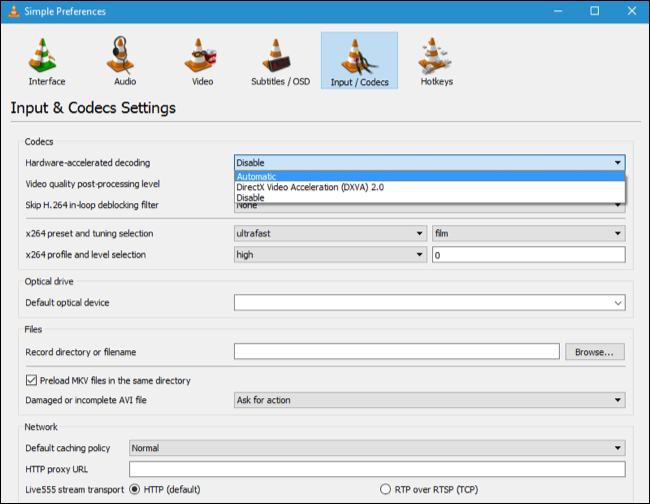
To enable hardware acceleration in VLC, head to Tools > Preferences.
Click the “Input / Codecs” tab, click the “Hardware-accelerated Decoding” box under Codecs, and set it to “Automatic”.


VLC lists the video codecs it can accelerate. On Windows, H.264, MPEG-1, MPEG-2, WMV3, and VC-1 are all hardware accelerated. On a Mac, only H.264 is hardware accelerated. Videos that aren’t hardware accelerated will play normally.....VLC will just use your CPU and you won’t get any battery life improvement.

>>Movies & TV is also not a bad option..!

If you want to save battery life, you can always use the “Movies & TV” application included with Windows 10.It is the default video player on Windows 10, so just double-clicking a video will open it in Movies & TV, assuming you haven’t gone out of your way to install a different video player and set it as your default video player.
While you might assume that, Movies & TV would be slower and heavier than a traditional desktop application like VLC, you’d be wrong. It’s designed to provide properly hardware accelerated playback for optimal battery life on laptops and tablets, while VLC isn’t.

>>Enable Hardware Acceleration in Other Video Players

If you have another preferred video player, be sure to poke around in its options–or perform a web search for the name of the video player and “hardware acceleration”–to ensure you’ve enabled the hardware acceleration option. If the video player doesn’t offer hardware acceleration, you probably shouldn’t use it while your laptop is on battery power.
   

        What Does The Refresh Option In Windows Actually Do? It’s Not What You Think


Most of us constantly keep refreshing our Windows PCs or laptops. Many times, we just do this but we don't know why..?
But, we haven’t of the actual thing the Refresh option does to our PCs. Here is i am going to tell you what it does really...!!


Until a few days ago, I, being a loyal Windows user from the time when I got hands on my first desktop machine, believed that the Refresh option in Windows clears the system memory, making it clutter free. But, all my beliefs turned out to be false when I finally I dug through the internet for the actual task performed by the Refresh option in Windows.
What actually happens is that Windows has an auto-refresh feature inbuilt by Microsoft which enables the screen to display the changes made to a folder–even desktop is just a folder for your operating system either by you or a third-party application or if you want to re-align the folders on your desktop.


Sometimes, the auto-refresh option fails to display the change on your screen. So, you have to manually do it yourself by clicking the Refresh button in the context menu. I would like to tell you that no miracle happens when you click the refresh button. It won’t make any changes in the performance.


Most people, including me, have developed a habit of constantly refreshing Windows for no reason. I have shifted to Ubuntu recently and I find myself searching for the Refresh option in the context menu, but it is nowhere to be seen because Linux-based operating systems don’t have it.
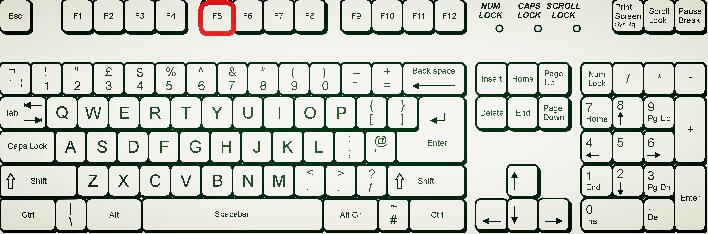
It seems like a daily ritual for most of us, our hands involuntarily keep pressing the F5. And some of us even overcome our laziness and refresh windows using a mouse which is a tiresome job, though. So, try to get rid of this bad habit.


Technically... consider a frame generated by your OS as an image. Frames are displayed on your screen one after the other giving you a feel that everything is continuous. Each frame comprises of different  (User Interface) components like background, icons and their names. When each frame is constructed, all the components are placed on it, like first the background, then the icons and their names. The taskbar acts as a layer which is placed on the top of the background.


The refresh option marks all the components of the screen as dirty, so, the whole screen is recreated in the next frame and displayed on your monitor. That’s the main purpose of #Refresh button...

Keep following for more such stuff: Tech-Eye 
   
Time to get Unsubscribe From All annoying Emails in Gmail At Within a Minute because we are here with an awesome trick that will let you unsubscribe all your Annoying Emails in Gmail with one click, The better part of this trick was you don’t need to use any extra 3rd party software to perform this action

How to Unsubscribe All Annoying Emails In Gmail At Once

The method is very simple and depends on a cool portal that will allow you to get unsubscribed from all the networks that irritate you in your emails. So follow up some simple steps below to proceed.

          Also Read: Books one must read in his life

Steps To Unsubscribe All annoying Emails In Gmail:

Step 1. First of all, you need to visit the site unroll.me in your PC browser. Now there simply click on Get StartedNow.
Step 2. Now you just need to sign up for your email account there where you want to unsubscribe from annoying emails.

          Also read: Tips for a good CV

Step 3. Now you simply have to allowthe access  to your account.

Step 4. Now on the next screen, you will be able to found your subscription, you  just have to click onon continue to proceed to next step.

             Also read:how to use trial softwares for lifetime

Step 5. Now simply click on unsubscribe in the front of services that you want to Unsubscribe from your email.

Step 6. That’s it! You are done, now you will get unsubscribe from all other annoying emails from your account.
For more such interesting stuff follow me on : Google+
                                                                                             Facebook
                                                                                           
                                                                                             Wordpress
Copyright © 2013 Tech4Geeks